

Build a system that connects online + offline signals to boost your ROI from online ads.
Done with server-side Google Tag Manager.
First-party Data Masterclass
Level: Advanced
Expected duration: 8 hours
Last update: October 16th, 2026
10,000+ students from various organizations have benefited from our paid courses


The Trap of a Passive Server-side GTM Setup
Your company or a client heard that server-side Google Tag Manager is necessary to avoid ad blockers and increase data accuracy. You created a server and added a custom domain. You’re now officially “Server-side”.
But is your server-side GTM significantly improving revenue?
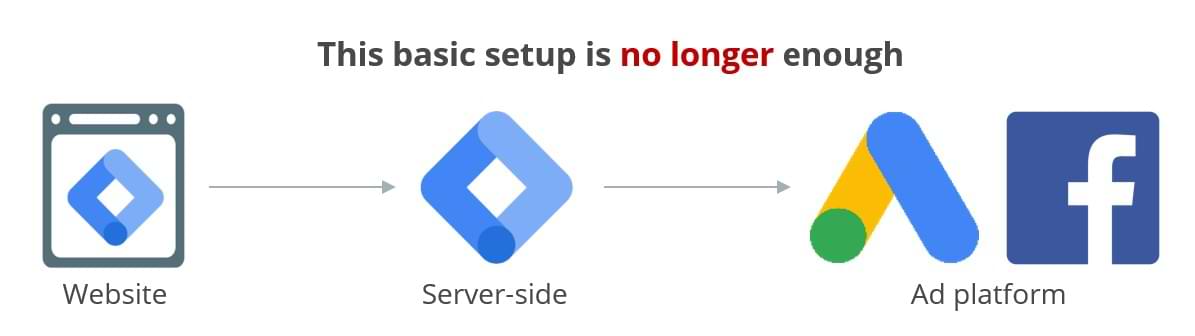
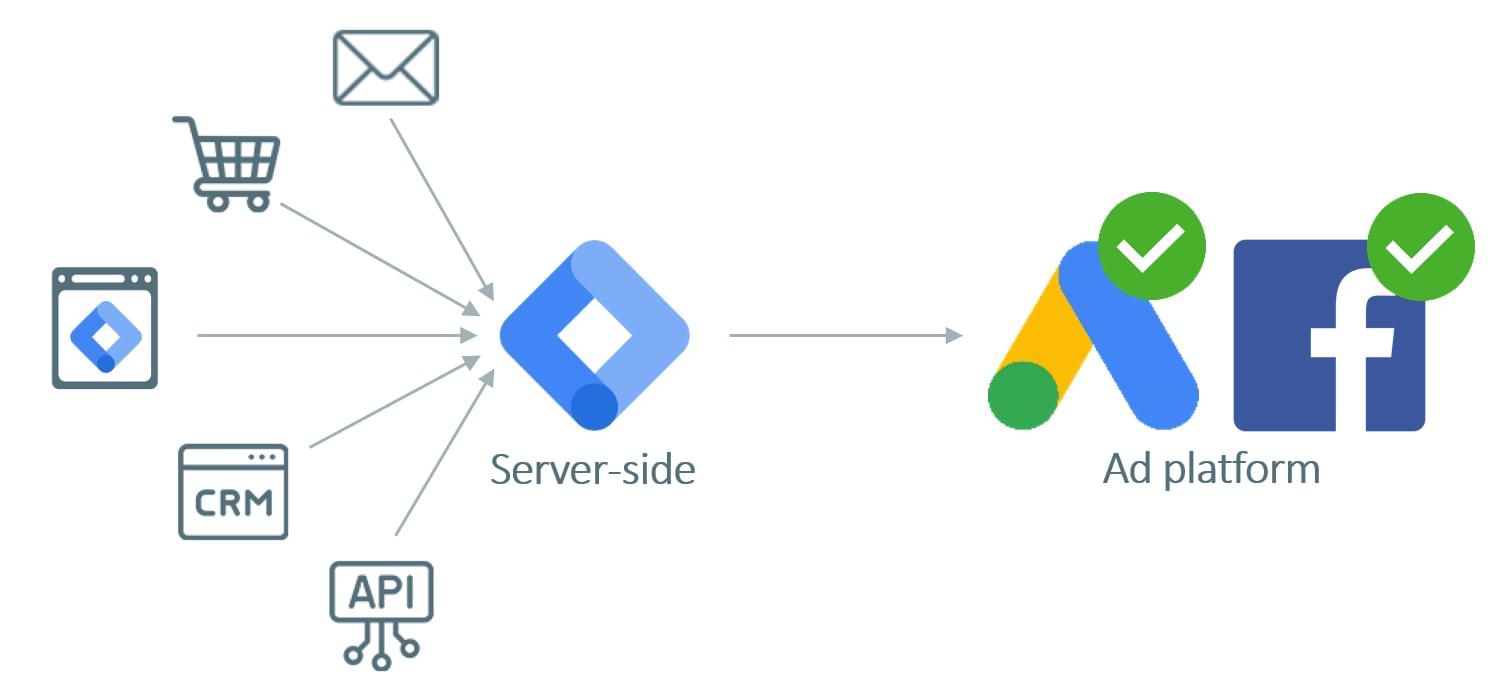
Most SGTM setups today are basically “Dumb Pipes”. They take “thin” data from the browser and simply forward (proxy) it to Meta or Google. You are paying for server costs just to act as a middleman. If your server only sends what the browser gives it, you are wasting its potential.
To truly take your measurement to the next level, you need to move beyond proxying and start doing Data Enrichment.
Give ad platforms the data they need to bring you more customers
Google, Meta, and other ad platforms are evolving. It’s not just about “more data”. It’s about the quality of signals.
Sending revenue data with conversions was enough in 2020. Now, that is just the baseline.
When you feed Ad Platform algorithms rich data (like profit margins, user-provided data, etc.), they start finding more of your best customers for less money.
This data isn’t always available in the Data Layer, but with the right server-side setup and proper data enrichment, it’s no longer a problem.
What kind of improvement are we talking about?
Naturally, the results vary depending on your industry and current setup, but here are some of the examples that speak for themselves:
- Sending new customer data increased ROAS by 9% on average (source: Google)
- Profit data sent to Google reduced acquisition costs by 58% (source: Demand More)
- Focus on POAS (profit on ad spend) increased net profit by 40% (source: Portivo)
Of course, we must understand that sending richer data is only half the battle. The success also depends on your creative strategy and campaign management. But you cannot deny that strong data is the unfair advantage.

“I’ve had experiences with a lot of different online courses, price ranges from low to high, and AnalyticsMania classes are honestly the best money I’ve spent on myself. I’ve retaken some of their courses in full several times during the past couple of years, and I continue to fall back on their material. Thanks, Julius + team, for continuing to update this while Google has been taking us all on a development ride…”
– Johanna Alm, Senior Digital Analyst at Försäkringskassan

What are the use cases of this course?
Data enrichment unlocks a whole new level of possibilities with server-side Google Tag Manager. Here are some of the things you will be able to achieve after completing this course:
- Boost conversion attribution: When your data layer lacks user details, you’ll learn to use APIs to fetch missing info (like emails or names) mid-stream. This makes sure Google Ads, Meta, and other vendors get the data they need to attribute sales more accurately.
- Precise new-customer targeting: Stop guessing who your new users are. You’ll learn to query customers’ purchase history in real-time to automatically add the new_customer parameter for Google Ads, even if your website’s front-end doesn’t support it.
- Optimize for profit, not just revenue: A high price doesn’t always mean a high profit. A $400 product might only make you $40 in profit, while a $100 product makes you $60. You’ll learn how to pull cost data from your database to send actual profit to your ad platforms. This way, your ads focus on the products that actually make your business money, not just the ones with a high price tag.
We will go through these examples in detail, along with other use cases that help you get more value from your first-party data.
What will you learn in this course?
In this masterclass, you will learn:
- The RSS Framework: Build a scalable 3-level data process (Retrieve, Store, Sync) to increase your “Data Strength” and improve platform attribution.
- Webhooks & APIs: Sync offline conversions from your CRM or CMS to SGTM so your ad platforms finally see the leads that actually turn into revenue.
- HTTP Lookups: Enrich tracking in real-time with your backend data to move beyond “thin” browser signals.
- First-party Databases: Use the Stape Data Store (previously “Stape Store”) to save and access customer data reliably.
- Low-Code Automation with n8n: Connect your data ecosystem and keep data fresh while saving hundreds of dollars on expensive Zapier tasks.
- Optimize for Profit, Not Just Revenue: Configure Google Ads to bid based on actual margin data and new customer parameters rather than total transaction value.
- Google Data Manager API: This is what Google wants you to use to send first-party data (conversions and customer lists).
❝Now I have better match quality in Meta Ads❞
“I’m less dependent on developers, which is always a good thing. I have a better match quality in meta ads thanks to HTTP lookups, and I also successfully sent profit instead of revenue thanks to using Stape store.”
– Marin Radovan, Analytics and Martech Expert –
What can you expect from this course?

8 modules
60+ videos that will show you a step-by-step process to learn first-party data orchestration

Practical knowledge
You will apply these techniques to your own website and server-side GTM container to see real-world results.

Support & Personal Feedback
Got questions? You will get the answers. Enroll now, and you will get multiple options on how to get help. You can join the private community for students. Also, there is a comment section under each lesson where we can discuss.

Quick quizzes
At the end of every module, there is a quick quiz to ensure you have gained the most out of the lessons.

Lifetime access to the course & Free Updates
Your purchase includes lifetime access to the materials. Every time the course is updated, you get the new content for free.

Course completion certificate
Finish the course and you get a completion certificate. Yours to add to LinkedIn, or to show an employer who asks for proof.

30-day money-back guarantee
If you complete this course and still don’t understand data enrichment with server-side Google Tag Manager, email me for a refund. No questions asked.
Is this course right for you?
This masterclass is designed for technical marketers and analysts who already know the basics of server-side tagging and are ready to move from basic SGTM to data enrichment.
✅ You should enroll if:
- You already have a working SGTM container (ideally on Stape.io, and if you don’t, we include a 30-day free Stape coupon inside the course so you can build your sandbox risk-free)
- You know how to map custom domains and implement custom loaders
- You are already familiar with SGTM features such as clients and transformations.
- You are looking for ways to lower the cost per acquisition and increase conversions by providing better targeting signals
- You want to integrate offline actions (e.g., sales) into your online tracking
- You are ready to use low-code tools like n8n and Stape to gain more independence from IT
❌ This course is NOT for you if:
- You are a total beginner who hasn’t set up server-side Google Tag Manager before
- You do not have your own website and a custom domain to practice on (even a website with no traffic is good enough for the course)
- You are looking for a basic “how-to” on simple tag implementation
- You want to learn how to run campaigns with various ad platforms. This course is about enriching conversion data sent to ad platforms; it’s not about ad management.
- You expect to learn deep JavaScript software development (we focus on high-efficiency, low-code workflows). For JavaScript, I offer another course.
This course is on-demand. You can learn at your own pace and apply new knowledge to your server-side GTM container. Access 24/7.
Your instructor

Julius Fedorovicius is the founder of Analytics Mania and GTM/GA4 communities on Facebook. Also, he is one of the top Google Tag Manager / Google Analytics 4 practitioners in the world.
Julius has been actively publishing articles on analyticsmania.com, a blog that helps thousands of thousands of marketers/analysts every month and that has been featured on widely known websites like moz.com, neilpatel.com, the official Google Analytics social media accounts, etc.

“Before Analytics Mania’s courses, I mostly used the basics of GTM. I knew there were more advanced options to improve the setup, but I mostly relied on developers to improve tracking. Now I have many more possibilities to track without having to disturb my developer colleagues. And for the cases where I do actually need their help, I have a much better understanding of what I need them for, which makes our communication more efficient. Using our combined skills we can take our tracking setup for our clients to the next level!”
– Sander Kroon, Business Analyst at BTTR.
Course curriculum
Here is the list of topics that you will learn in this course. Lessons are practical, and you will practice some lessons on a sandbox website (which the course provides).
Have a question? Feel free to ask!
Module 1: RSS Framework
Get a clear roadmap for your tracking setup. This module introduces the 3-step RSS framework you’ll use to fetch, save, and sync your first-party data across all your systems.
Module 2: Webhooks
Learn how to catch and process data from your CMS, ecommerce platform, etc. This module shows you how to bridge the gap between offline events and your tracking server. Topics covered:
- What are webhooks
- Configuring webhooks to send data to your SGTM
- An alternative way to retrieve data from websites
- Catching webhook data with SGTM
- Sending offline conversions to Google Ads via Google Data Manager API
- Managing Customer Match Lists in Google Ads via SGTM
Module 3: HTTP lookups
Retrieve data in real-time from your backend or third-party platforms. This enables you to enrich events dynamically before they are sent to marketing vendors. Topics covered:
- Working with APIs
- HTTP lookup variable
- Different types of authentication
- Doing HTTP lookups to your website’s backend
- Doing HTTP lookups to other systems
Module 4: SGTM database (Stape Data Store)
Build a reliable first-party database to store user data, product data, etc. Learn how to maintain your own storage to power enrichment workflows. Topics covered:
- What is a NoSQL database, and why use it?
- Storing data in Data Store
- Reading data from the Data Store to enrich events
- Optimizing the number of requests (to reduce server costs)
Note: Don’t worry about platform costs while learning. This masterclass includes a 30-day free coupon for Stape so you can build and test your NoSQL database completely free.
Module 5: Using n8n to connect your systems
Build an automation to act as the “glue” for your data ecosystem. This module teaches you how to connect systems without very high monthly fees.
Topics covered:
- What is n8n and how to use it?
- Overview of the n8n interface
- Main n8n features that you’ll need and how to use them
If your company is not using n8n (maybe they prefer Zapier or Make.com), it’s still ok. The idea of this module is to show you the principles of low-code (or no-code) tools to connect your backend and Stape Data Store.
Module 6: Use case - Identifying returning customers
new_customer parameter lets you inform Google Ads whether the customer is new or not. It can be used to run more precise Customer Acquisition campaigns in Google Ads and focus on real new customers (rather than retargeting the existing customer base). This module is useful if your website does not include the new_customer parameter in the dataLayer. Topics explained:
- Load historical customer data to Stape Data Store with n8n
- Processing new orders and storing them in Stape Data Store with n8n
- Creating a variable that returns the correct new_customer value
- Sending new_customer to Google Ads
Module 7: Use case - Profit on Ad Spend (POAS)
The ultimate performance metric. Learn how to send actual profit margins to your reports (instead of revenue) to find the traffic that truly drives your business’s bottom line. Topics explained:
- Loading the profit margins to Stape Data Store
- Calculating and sending profit data to Google Ads
- Things to configure in Google Ads once you switch to profit tracking (POAS)
Module 8: Privacy and Consent
Server-side GTM is not a workaround for consent and privacy. You still need to respect it and adjust your tracking accordingly. Moving your data pipelines to the server requires more, not less, control over privacy. This module shows you how to normalize and hash sensitive data, verify your outputs, and use consent parameters. Topics explained:
- What is hashing, why is it important, and how to do it
- Hashing in various stages of your SGTM pipeline
- Sending hashed data to Google and non-Google vendors
- Managing and using consent parameters
Bonus module
Additional lessons about First-party data and enrichment. This module is expected to grow over time. Currently, it contains an example of how to send conversions (enriched with user data) to non-Google vendors (e.g., Meta/Facebook).

“Analytics Mania helped make my work significantly more efficient. Although I consider myself good at staying up to date with the documentation, Analytics Mania provided detailed, step-by-step instructions on setting up and managing Google Tag Manager, making it easy to follow along, even with more complex tracking setups.
Content on server-side tagging is particularly useful. These insights allowed me to streamline tracking across all platforms, improving the accuracy of both data collection and reporting.
Overall, Analytics Mania has been a valuable asset in optimizing my workflow and enhancing my GTM capabilities. With that said, I highly recommend Julius to anyone looking to sharpen their skills in this essential tool for web analytics!”
– Milan Stevanovic, Web/Marketing Analyst at GrowMojo Co.
A sample lesson from the course
This lesson is from module #3 where I explain how to catch webhook data with server-side Google Tag Manager
Transform your tracking into a competitive advantage. Enroll now.
One-time payment. Instant access.
- Instant access to the course material
- Practical examples
- Quizzes to test your knowledge
- Support
- Course completion certificate
- Free updates
- Lifetime access
- 30-day money-back guarantee
- Bonus: 30-day free Stape.io coupon code
Price: $299 USD
+ additional taxes may apply
Team discounts are available
Lifetime access. Free updates. Available 24/7.
30-day money-back guarantee.
4 monthly payments. Instant access.
- Instant access to the course material
- Practical examples
- Quizzes to test your knowledge
- Support
- Course completion certificate
- Free updates
- Lifetime access
- 30-day money-back guarantee
- Bonus: 30-day free Stape.io coupon code
4 months x $79 USD
+ additional taxes may apply
Team discounts are available
Lifetime access. Free updates. Available 24/7.
30-day money-back guarantee.

Bundle
2 Premium courses
- Instant access to Intermediate/advanced GTM course and this First-Party Data course
- Practical examples and quizzes
- Support
- Course completion certificate
- Free updates & Lifetime access
- 30-day money-back guarantee
- Bonus: 30-day free Stape.io coupon code
Price: $599 $748
+ additional taxes may apply
Team discounts are available
Lifetime access. Free updates. Available 24/7.
30-day money-back guarantee.
Looking for a team discount?
The prices that you see above are for the first user. If you want to enroll multiple team members (from the same organization), the pricing gets better. Contact us to learn how to enroll multiple users at the same time.
If you decide to add additional team members in the future, this team discount will still apply.
If you buy one course:
- 1 additional user with a 1-time payment costs $100
- 1 additional user with a monthly plan increases every payment by $25
If you buy a course bundle (Intermediate/advanced GTM Course + this First-party data course):
- 1 additional user with a 1-time payment costs $150
- 1 additional user with a monthly plan increases every payment by $25
Examples:
- 2 users buy a First-Party Data Masterclass with a 1-time payment: $299 + $100 = $399
- 2 users buy a First-Party Data Masterclass a monthly plan 4 x ($79 + $25) = 4 x $104
- 2 users buy a course bundle (Intermediate/advanced GTM Course + this First-party data course) with a 1-time payment: $599 + $150 = $749
Frequently asked questions
This course starts when you enroll in it and never ends! It is a completely self-paced online course – you decide when you start and when you finish. No deadlines.
The course contains ~8 hours of video content. The speed of course completion depends on how fast you learn, what video playback speed you will use, and how much you already know.
In many cases, employers pay for the course. Here are some thoughts:
- Feeding verified CRM and backend signals directly into ad platforms is a proven way to lower acquisition costs (in other words, better return on ad spend)
- Even less dependency on your IT department. This course teaches a “Low-Code” approach that allows the marketing team to build and maintain data pipelines independently, moving projects from months to hours or days.
- Instead of months of trial and error (and potentially wasted ad spend), this course provides a clear, step-by-step roadmap to implementing advanced first-party data strategies immediately.
Yes, you will receive a course certificate after you have gone through all course material.
How does lifetime access sound? After enrolling, you have unlimited access to this course for as long as you like – across any and all devices you own.
Yes. And if the update is published, all existing course students get it for free.
This course is for intermediate server-side Google Tag Manager users who want to take their skills to the next level. Before taking the course, you must already know:
- the fundamentals of SGTM (clients, tags, triggers, HTTP requests)
- Custom domain mapping
- Custom loader (that hides request parameters from browser extensions)
- Data tag and Data client
- Transformations
Also, you must already have the following things:
- A website (even if it has zero traffic and default settings. For example, a plain WordPress website is fine)
- Custom domain that is used by the website
- Server-side GTM container mapped to a custom domain/subdomain. Don’t worry, I will provide a coupon code that gives you Stape’s Pro plan for 30 days free. You can use that to host your SGTM container.
Due to the nature of server-side GTM, I cannot provide a sandbox website in this course.
I would never want you to be unhappy! If you are unsatisfied with your purchase, contact us in the first 30 days and we will give you a full refund.
Yes, all videos have English subtitles
Yes, even if it has zero traffic and default settings. For example, a plain WordPress website is fine.
Also, you must have a custom domain linked to your website (which means that if you enter yourdomain.com in the browser, your demo site loads).
Finally, you should already have a web GTM and server-side GTM containers that are implemented on that website.
It’s highly recommended. Even though there are plenty of lessons that can be applied to any SGTM setup, some modules heavily rely on Stape’s functionality (e.g., Data Store).
Even though the Data Store is a paid feature, I will provide a coupon code that gives you Stape’s Pro plan for 30 days for free. That should be enough for learning.
No, the price you see on this page is without taxes, therefore, the final price might increase on the checkout page based on your billing address.
If you choose a monthly payment plan, you’ll need to complete a certain number of payments (it depends on the course/bundle). Once you make the first payment, you get instant access to all the content of the course/bundle.
When the next month comes, the course platform will automatically make another payment. Some banks might require you to approve the payment. In that case, you’ll receive an email about that with further instructions.
After all monthly payments are complete, you’ll keep lifetime access to course/bundle that you purchased.
Feel free to send me an email to [email protected].
Become a First-Party Data Specialist. Enroll now.
One-time payment. Instant access.
- Instant access to the course material
- Practical examples
- Quizzes to test your knowledge
- Support
- Course completion certificate
- Free updates
- Lifetime access
- 30-day money-back guarantee
- Bonus: 30-day free Stape.io coupon code
Price: $299 USD
+ additional taxes may apply
Team discounts are available
Lifetime access. Free updates. Available 24/7.
30-day money-back guarantee.
4 monthly payments. Instant access.
- Instant access to the course material
- Practical examples
- Quizzes to test your knowledge
- Support
- Course completion certificate
- Free updates
- Lifetime access
- 30-day money-back guarantee
- Bonus: 30-day free Stape.io coupon code
4 months x $79 USD
+ additional taxes may apply
Team discounts are available
Lifetime access. Free updates. Available 24/7.
30-day money-back guarantee.
Bundle
2 Premium courses
- Instant access to Intermediate/advanced GTM course and this First-Party Data course
- Practical examples and quizzes
- Support
- Course completion certificate
- Free updates & Lifetime access
- 30-day money-back guarantee
- Bonus: 30-day free Stape.io coupon code
Price: $599 $748
+ additional taxes may apply
Team discounts are available
Lifetime access. Free updates. Available 24/7.
30-day money-back guarantee.
30-day money-back guarantee
If you complete this course and still don’t understand data enrichment with server-side Google Tag Manager, email me for a refund. No questions asked. Learn more about our refund policy.