


February 21, 2024
Two Link Click Events in Google Tag Manager Preview Mode
If you landed on this page, chances are that you are seeing two Link Click events in Google Tag Manager preview mode (even though there was just one click). In this blog post, I will explain why this happens and if this is a problem.

Why is happening?
The main reason why this happens these days is that you are probably using Google Tag Manager and Google Analytics 4 on the same website at the same time.
When you have at least one Just Links trigger enabled in your GTM container, you start seeing Link Click events in the preview mode. That is normal.
The 2nd click appears when you have installed Google Analytics 4 AND you have File Download or Outbound Link click tracking in your Enhanced Measurement settings.

How to check if link click tracking is enabled in Enhanced Measurement
Go to the admin panel of your Google Analytics 4 property. Then (in the Property column) click Data Streams. Select web data stream.

This will open the settings of your web data stream. Check if Enhanced Measurement is enabled. If yes, check if Outbound clicks or File Downloads are enabled.

If yes, then the issue I describe in this blog post applies to you.
Is this issue a problem?
Not really. Even though you have two Link Click events in the preview mode, your GTM tags will fire only on those Link Clicks that are tracked by Google Tag Manager.
So what to do?
Honestly, nothing. GTM tags will fire only on those Data Layer events that were dispatched by Google Tag Manager.
I did some additional tests to prove my statement. Here’s what happens in the preview mode if Link Click is tracked by Google Tag Manager and the trigger conditions are met:

And here is that 2nd link click that was dispatched by Google Analytics 4 on the same event. The tag did not fire (even though trigger conditions were met).
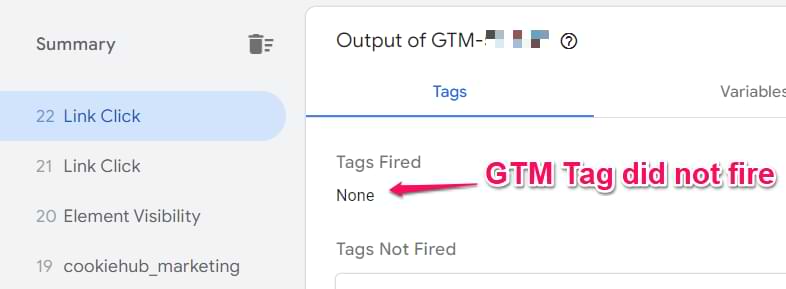
Why? Because of this parameter in the Data Layer:

When the Link Click event is dispatched by Google Analytics 4, the parameter’s value is different from the event that was tracked by Google Tag Manager. So you’re safe.
You would have a problem if you had two Link Click events and the same GTM tag fired on both events. If that happened, it would mean that something else is causing an issue and it must be fixed.
If this article didn’t help you, please let me know in the comments. I might update the guide accordingly with additional tips.

2 COMMENTS
Is there anything else that can cause two clicks and/or link clicks to fire into the preview console? I'm working with a site that hasn't implemented GA4 yet.
Hi Julius,
I have a similar issue. I installed both UA and GA4 on the site and received two "link click" events in GTM preview despite only clicking the link once. I tested and discovered that one is from UA and the other is from GA4, and they have different two gtm.trigger parameters. The issue is that the same UA tag is fired on both of these "link click" events, resulting in double counting. Is there anything I can do about it? Thank you very much for your assistance!